There’s been plenty of buzz about iOS 26’s Screen Unknown Senders feature. After investing in registration, consent, and messaging costs, what if the end user doesn’t even see your text? In some cases, that can happen–but the dynamic isn’t new. Device-level filtering has existed on the two dominant handset messaging applications in the US (iMessage and Google Messages) for years. And at a broader level, carriers have long worked to ensure messaging traffic is “known” through the registration of business messaging campaigns and user opt-ins. What’s happening now is another turn of the same dial.
Where do messages get filtered?
To understand where a message’s journey can pause before reaching a subscriber, it helps to think of protection in three layers—each one a gate on the path to the screen:
- Network / Carrier. Registration, vetting, and network filtering (in the US via The Campaign Registry for 10DLC) determine who can send and under what rules.
- On-device screening. The phone’s OS and default messaging app work together to sort messages locally and control notifications.
- User Controls. People can mute, block, report, or promote threads (for example, by saving a contact to their device).
If you send registered A2P traffic in the US—whether over 10DLC, Toll Free, Short Code, or RCS – you already know the network layer. Most phone owners also know the user layer from manually blocking a number on their own device. The heart of today’s conversation sits in the middle: the OS and App layers, where senders have the least control and users often perceive a ‘black box.’
Message Filtering on Android
In 2019, Google Messages, Android’s dominant messaging application, rolled out automatic spam detection by default. Using on-device machine learning, messages marked as likely spam began routing to a Spam folder without user input. Since then, Google Messages has quietly filtered in the background; most people don’t think about it until they check the Spam view. Public updates in 2024 described protections at an enormous scale, underscoring that Android users have enjoyed these guardrails for years.
Bottom line for Android: default, low-friction filtering has been the norm for a long time.
Message filtering on iOS
- 2017 (iOS 11): Apple introduced “Filter Unknown Senders” which is an opt-in setting that uses a tabbed interface in iMessage. Texts from numbers not in Contacts were flagged as ‘Unknown’ and could be viewed in a new Unknown folder, but the message would still land in the user’s primary inbox, and the user would continue to get a notification for the text. Replying, adding the number to Contacts, or turning off the setting would remove texts from the Unknown folder.
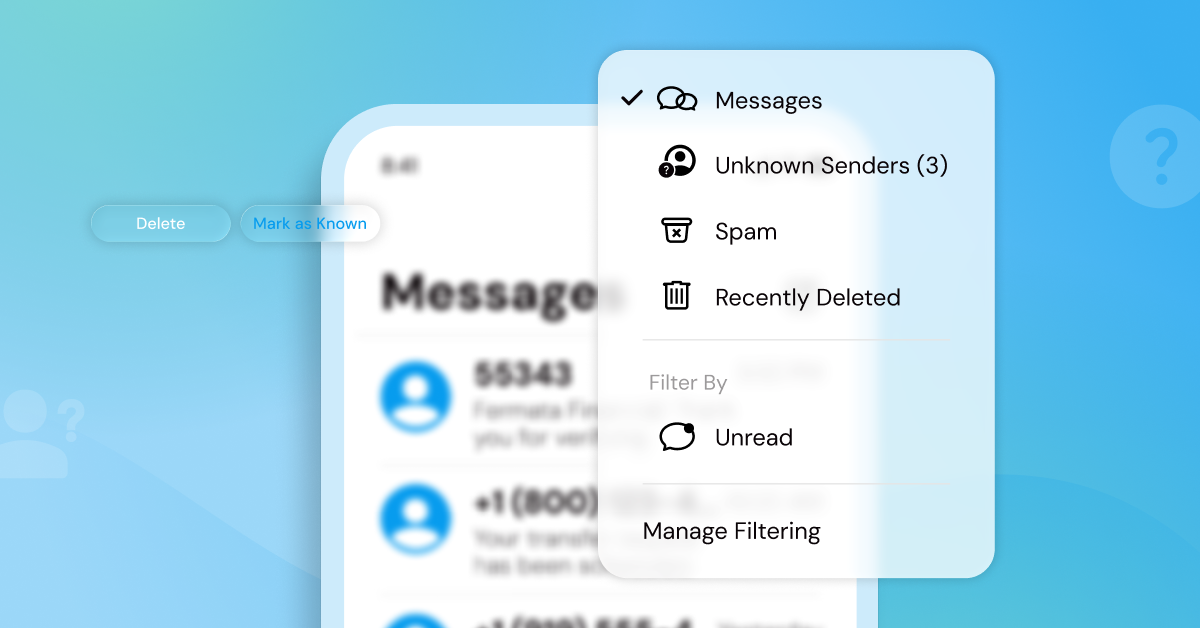
- 2025 (iOS 26): Apple expanded and rebranded the experience as “Screen Unknown Senders.” Messages from unknown numbers now skip the mobile user’s primary inbox and go straight to the Unknown folder without triggering a notification. Apple also identifies and tags certain Unknown messages as “Time Sensitive,” based on the content of the message (one time password, appointment alerts) giving them temporary visibility in the primary inbox. A new “Mark as Known” action lets users quickly elevate a legitimate sender. iOS also makes the distinction explicit between “Unknown” and “Spam,” so people can choose to reply, delete, or block with more confidence.
As iOS 26 rolls out, Apple accounts for roughly half of the US smartphones and a sizable share globally, so when iMessage changes how it labels and notifies—it has our attention! But the underlying idea isn’t novel; both Google Messages and iMessage have been steering attention toward known, expected senders for years, and business messaging senders can get involved by evolving best practices.
Where this leaves senders
This isn’t upheaval; it’s alignment with the broader messaging ecosystem. Android normalized quiet filtering years ago; iOS has simply made its stance more explicit. The network layer still determines whether your traffic is delivered, but the device layer increasingly governs whether it’s noticed right away. And that’s the crux for senders: SMS’s premium value is immediacy. If the first touch lands quietly instead of with a notification, the channel hasn’t collapsed—but its value faces pressure.
The good news: this is just the next turn of the dial on protection, and our job turns with it. The way to keep SMS premium is to earn recognition fast—make the first message unmistakably brand-forward, start conversations from user intent, and give customers an easy path to elevate you from Unknown to Known. Device makers are refining the guardrails; we refine our messaging so it’s obviously useful, clearly expected, and worth promoting. That’s how you protect the ROI of the channel and keep the immediacy that makes SMS special.
Tips for moving forward
Keep doing what works! Echoing some of the tips outlined in our recent blog post on iOS 26, here are few steps you can take during your first touch to encourage subscribers to elevate your threads out of the “Unknown Senders” inbox:
- Lead with user-initiated text opt-ins. Use an SMS URL (special link that opens the user’s default messaging app with a pre-populated message to your businesses’ number) so the first thread starts from their action. A user-initiated thread indicates to iMessage that you know the sender and their texts are wanted.
- Use double opt-in to lock in consent and context. Confirm interest twice—once on a web page or form, then again via a simple “YES” reply to your confirmation text. This creates a clean audit trail and gives you an early interaction that may help move the thread into Known.
- Share a contact card in the welcome text. Include a .vcf in your first conversational exchange and ask the user to save it (“Add us to your contacts so you don’t miss updates!”)
- Adopt response-driven use cases early. Design day-one messages that invite a quick reply—short polls, numbered choices, light confirmations (e.g., “Reply 1/2/3,” “Reply YES to get your code”). Early back-and-forth both proves legitimacy to the recipient and accelerates promotion to Known without extra sends.
The Takeaway
iOS isn’t a plot twist. It’s another iteration of a multi-layer system designed to protect users while keeping registered campaigns effective. If your program centers on consent, recognizable identity, and clear first touches, then you’re well positioned to adopt the best practices that will ensure your messages keep the attention of mobile users.