Migrating contact center infrastructure without breaking it
Learn how Bandwidth supports parallel operation of on-prem and cloud environments during a phased migration, allowing you to decouple number porting from user onboarding.
You’ll Learn:
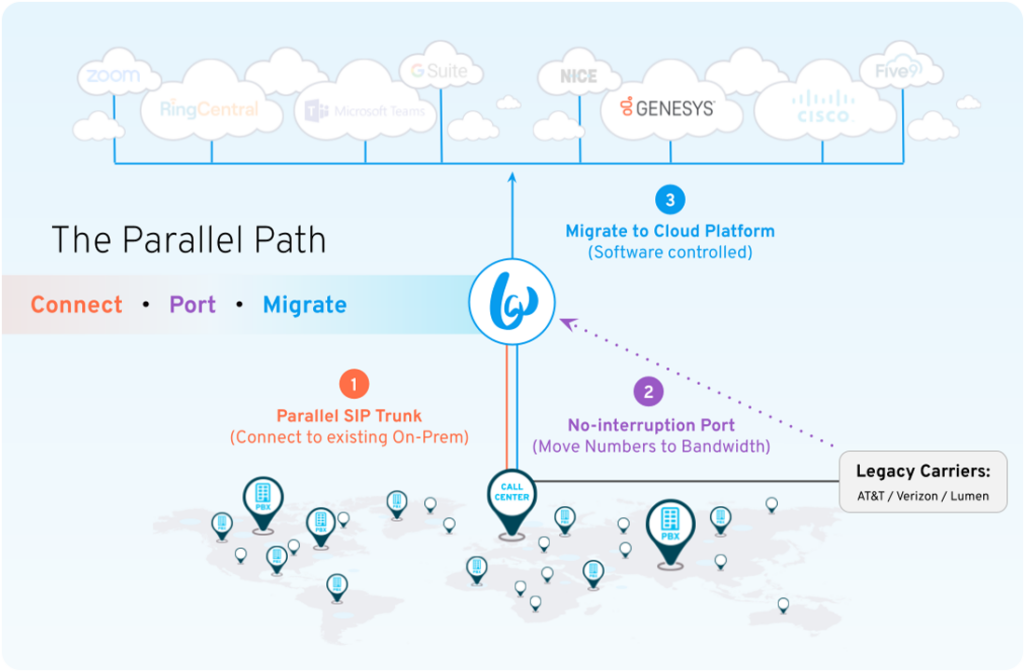
How Bandwidth’s parallel migration architecture connects to both legacy and new platforms at the same time
How to get a unified view of number inventory and routing state across the entire portfolio
Mergers, acquisitions, and platform consolidations create a specific kind of infrastructure headache: stack sprawl. You’re running legacy on-prem systems alongside new cloud platforms, sometimes across dozens of offices, each with its own SIP trunking provider, local carrier relationships, and routing configurations. You need to keep everything working while you untangle it.
This document describes how Bandwidth’s parallel migration architecture lets infrastructure teams maintain full visibility and control across both environments simultaneously, without forcing a hard cutover, without interrupting agent workflows, and mitigating the carrier execution risks that usually come with large-scale number porting
The challenge: migrating without breaking things
Most contact center migrations fail quietly before they’re finished. The symptoms are predictable:
Porting goes wrong mid-cutover and numbers go dark
Agents on the new platform can’t reach customers on the old one
Rollbacks take hours because routing changes require carrier intervention
In M&A scenarios, multiple acquired companies run incompatible stacks with no unified view
The root cause is usually the same: teams are forced to treat the migration as a single, irreversible event due to rigid carrier lead times. Bandwidth’s architecture changes that assumption by decoupling network migration from user onboarding.
How Bandwidth connects to both environments simultaneously
Bandwidth uses a concept called voice configuration packages to organize how phone numbers are routed. Voice Configuration Packages (VCPs) let you define and manage voice origination settings and routing functionality for groups of phone numbers irrespective of geographical constraints or the Location they’re stored in on your account.
During a migration, you create two VCPs inside your Bandwidth account:
Voice Configuration Package A: Legacy on-prem system
Replicates your existing contact center infrastructure. Numbers ported to Bandwidth sit here first. Agents and callers experience no change, since calls route exactly as they did before.
Voice Configuration Package B: Cloud contact center platform
Configured for your cloud platform using one of our pre-built Bring Your Own Carrier (BYOC) integrations. Ready to receive numbers before any agent is moved.
Once both configuration packages are live, the migration workflow follows a three-step sequence:
Step 1: Connect
Bandwidth installs a parallel SIP trunk alongside your existing carrier connections. This trunk connects to your on-prem platform without disrupting it. No numbers move yet. No agents are affected. You’re simply establishing the Bandwidth path.
Step 2: Port
Port your phone numbers from your existing carrier to Bandwidth before any migration work begins. Since this replicates your current environment, callers and agents don’t notice anything different. Call routing continues exactly as before.
By decoupling porting from the actual platform switch, Bandwidth removes the riskiest part of most migrations. The port is complete and stable before a single number moves to the new platform. And because everything runs through Bandwidth from this point, you can move numbers or roll back on your own schedule–not your carrier’s SLAs.
Step 3: Migrate
Once numbers are staged in Bandwidth, routing inbound traffic to a new cloud platform is an on-demand configuration change. You pick a cohort, reassign it to VCP B, and routing updates in real time. No carrier involvement or provisioning delays.
You set the pace, allowing the network cutover to precisely track your internal change-management schedules. Cohorts can be organized by geography, department, business unit, or acquired entity, whatever matches how your organization actually works.
See it in action
Managing stack sprawl across M&A/patchwork environments
In acquisition scenarios, the problem isn’t just moving numbers. It’s maintaining visibility across systems you may not fully understand yet. Acquired companies come with their own regional SIP trunking relationships, on-prem platforms from different vendors, and number inventories that weren’t centrally managed.
Bandwidth consolidates all of it under a single account. Each acquired entity gets its own set of VCPs within that account, with routing configurations that mirror their existing setup. Infrastructure teams get a unified view of the number inventory and routing state across the entire portfolio without requiring any acquired system to change on day one.
As rationalization progresses, numbers migrate cohort by cohort from each legacy system into the target platform. The Bandwidth App gives you an audit trail: where each number is, which VCP it belongs to, and what routing configuration is active.
Protecting agent performance during the transition
Agent disruption is the thing that turns a migration into a fire drill. When agents are learning a new interface, using new softphones, and routing calls through a system they don’t know yet, handle times go up. Abandon rates follow. CSAT drops. That’s not just a risk; it’s just what happens.
Bandwidth separates the number migration from the agent experience, which removes a layer of disruption entirely. Agents won’t hit bugs or dead air from numbers dropped mid-port. And because you control when each agent moves to the new platform, you can build internal champions first and slow-roll adoption from there. Until a cohort moves, those agents stay in the legacy environment with no change to their workflow.
When a cohort does move, it’s a scheduled event with a known rollback path. If something goes wrong, reversing it is a dashboard operation, not a carrier conversation.
Real-world rollback examples In one example, an office with insufficient Wi-Fi capacity for softphones was rolled back to the legacy system in minutes while the network was upgraded. A senior executive who missed platform training was individually rolled back until they completed onboarding. Both were addressed without carrier escalation or a change ticket—the kind of resolution that typically takes days through a traditional provider.
That granularity matters at scale. Large migrations don’t move cleanly. Individual users, departments, or offices will have issues. Being able to address them at the number level, rather than rolling back an entire platform, is what keeps average handle time (AHT) stable across the migration window.
How rollback works with Bandwidth
Because Bandwidth controls the routing layer, a rollback is a routing change, not a porting event. Moving a number from VCP B back to VCP A reassigns its routing configuration, typically in real time. That means you can make changes as needed, when you need them.
Carrier-based rollbacks typically mean opening a porting order, waiting for processing, and accepting a window of potential downtime. Bandwidth rollbacks are operational. You submit the change through the user interface or API. It takes effect rapidly, without the processing delays typical of carrier porting events—returning traffic to the stable on-prem SBC level.
Talk to a technical expert
Migrations at this scale don’t have to be all-or-nothing. With Bandwidth controlling the routing layer, your team stays in control of the timeline, the pace, and the rollback path—without waiting on carriers to execute changes that can’t wait. Reach out today and talk to an expert if you’re ready to map out a migration plan.